If you're an architecture firm still managing projects in Excel or Google Sheets, you're not alone. Most firms do. The spreadsheet tracks everything — project pipeline, client details, council submission status, fee invoices, design stages. It works, until it doesn't. Missed deadlines, forgotten follow-ups, version conflicts, no notifications. A custom project manager for architecture firm solves these problems without forcing your team to learn an entirely new system.
We don't sell a generic tool. We build custom project management software for architects — a spreadsheet-like web app tailored to your workflow. One row per project. Inline editing. Stage tracking, municipal status, fee status, next actions with due dates, file attachments and automatic reminders. It feels like the spreadsheet your team already knows, but it works like proper software.
Book a meeting to discuss your workflow. We'll understand how your firm operates, what your spreadsheet looks like today, and build a project architect project manager that fits — not the other way around.
Don't Replace the Spreadsheet — Make It Smarter
The winning strategy isn't to rip out the spreadsheet and force your team onto complex project management software. It's to make the spreadsheet smarter. Keep the familiar layout — one row per project, columns for status — and add what Excel can't: automation, notifications, document links, compliance checks and shared access. Architects accept this because it feels familiar. We build it because it works.
Why Architects Need a Better System
Architecture projects involve dozens of moving parts: client briefs, site visits, design iterations, council submissions, municipal approvals, fee schedules, contractor coordination, compliance sign-offs. Most firms track all of this in a single spreadsheet — and it works until someone forgets to update a row, a council deadline slips, or two people edit the file at the same time.
A custom project manager for architecture firm keeps the structure your team already uses but adds the features a spreadsheet can't provide:
- Automatic reminders — Never miss a council deadline, client follow-up or fee milestone again. The system notifies the right person at the right time.
- Stage tracking — See every project's design stage at a glance. From concept to working drawings to council submission to construction.
- Municipal status — Track council submissions, comments, approvals and rejections in a dedicated column. No more digging through emails.
- Fee status — Know which invoices are sent, paid or overdue. Link fees to project stages so nothing falls through the cracks.
- File attachments — Attach drawings, plans, council letters and client documents directly to the project row. Everything in one place.
- Next action + due date — Every project has a clear next step and a deadline. The team always knows what needs to happen next.
The result is a project architect manager that your team will actually use — because it looks and feels like what they already know, but does far more.
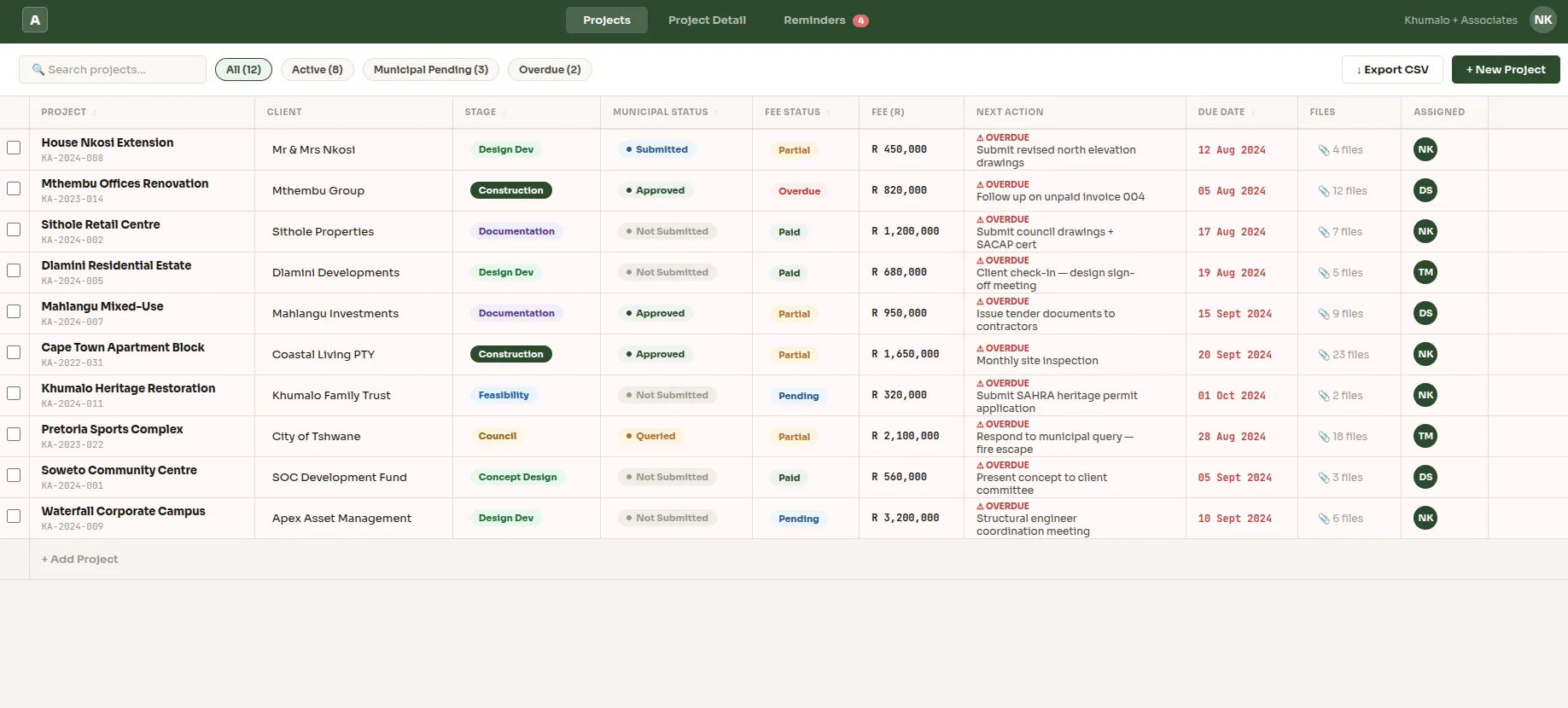
Projects Dashboard
A spreadsheet-like interface showing all active projects with inline editing, stage tracking, municipal status and upcoming deadlines.
What the First Version Includes
We don't build bloated software with features you'll never use. The first version — enough to replace your spreadsheet and get your team using it from day one — is a spreadsheet-like web app with exactly the features architects need:
- Projects table
- Inline editing
- Stage column
- Municipal Status column
- Fee Status column
- Next Action + due date
- File attachments
- Automatic reminders
That's enough to replace the spreadsheet. No training required. Your team opens a browser, sees a familiar table, and starts working. The difference: it notifies them, tracks changes, stores documents and never loses data to a version conflict.
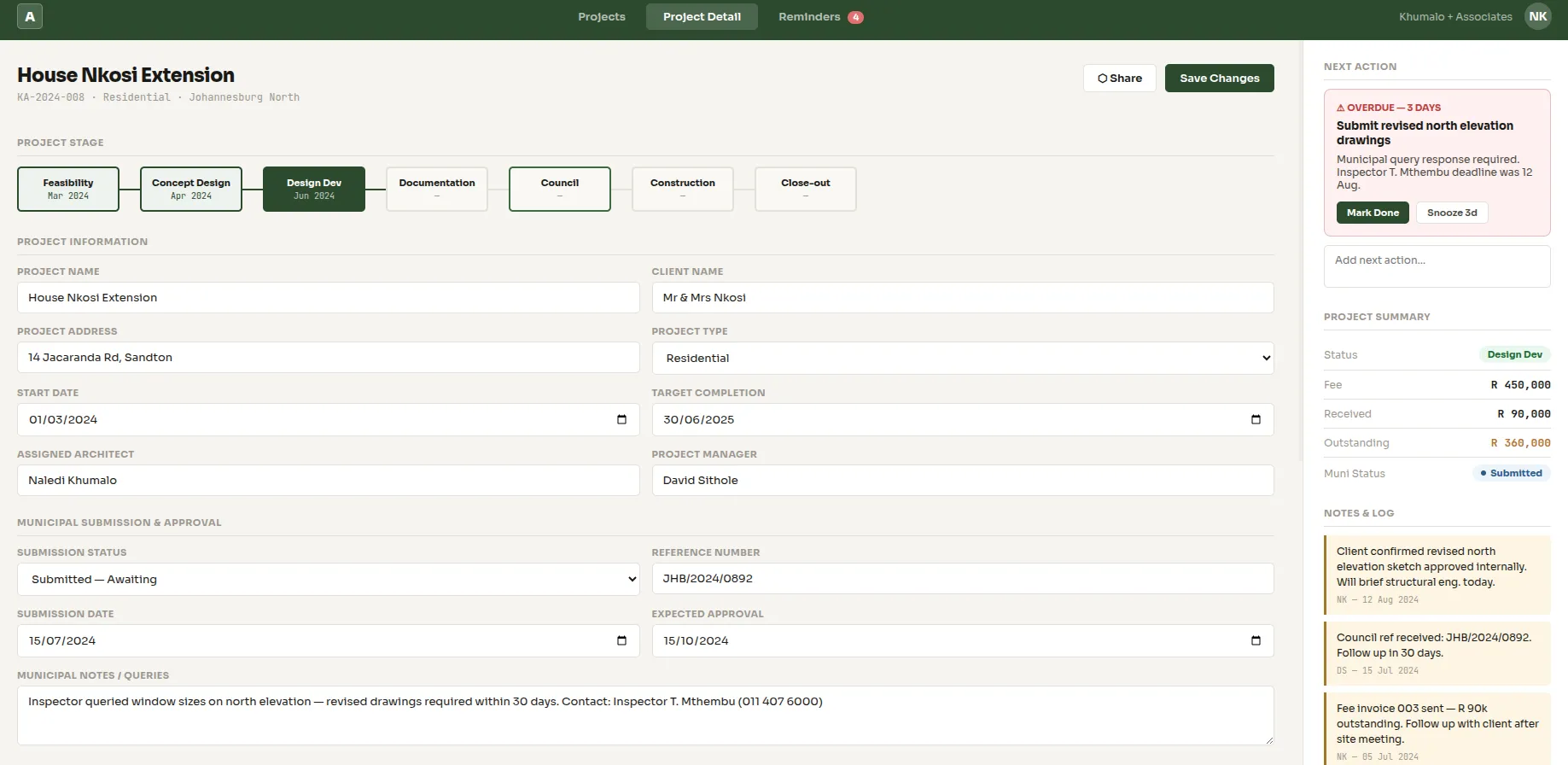
Inline Editing
Click any cell to edit — just like a spreadsheet. Update stage, status, fees and next actions without leaving the table view.
Asana for Architects
If you've looked at Asana for architects, you know the problem: it's powerful but generic. Asana is designed for any team, any industry. That means you spend weeks configuring boards, custom fields and workflows to match how an architecture firm operates. Council submissions? Fee milestones? Design stages? You're building all of that from scratch — and training your team on a system that doesn't speak their language.
A custom project manager for architecture firm starts with your workflow. Municipal status, design stages, fee tracking, compliance checks — all built in from day one. No configuration. No workarounds. No paying for features your firm will never use.
Trello for Architects
Trello for architects is a common search. Trello's card-and-board layout is intuitive for simple task management, but architecture projects don't fit neatly into columns. You need to see 30 projects at once — with stage, municipal status, fees, next action and deadlines all visible in a single row. Trello shows you one card at a time. For a firm managing a pipeline of projects, that's too slow.
Our approach: a table-first view that shows your entire portfolio at a glance. Click into a row for detail. The speed of a spreadsheet, the power of proper software.
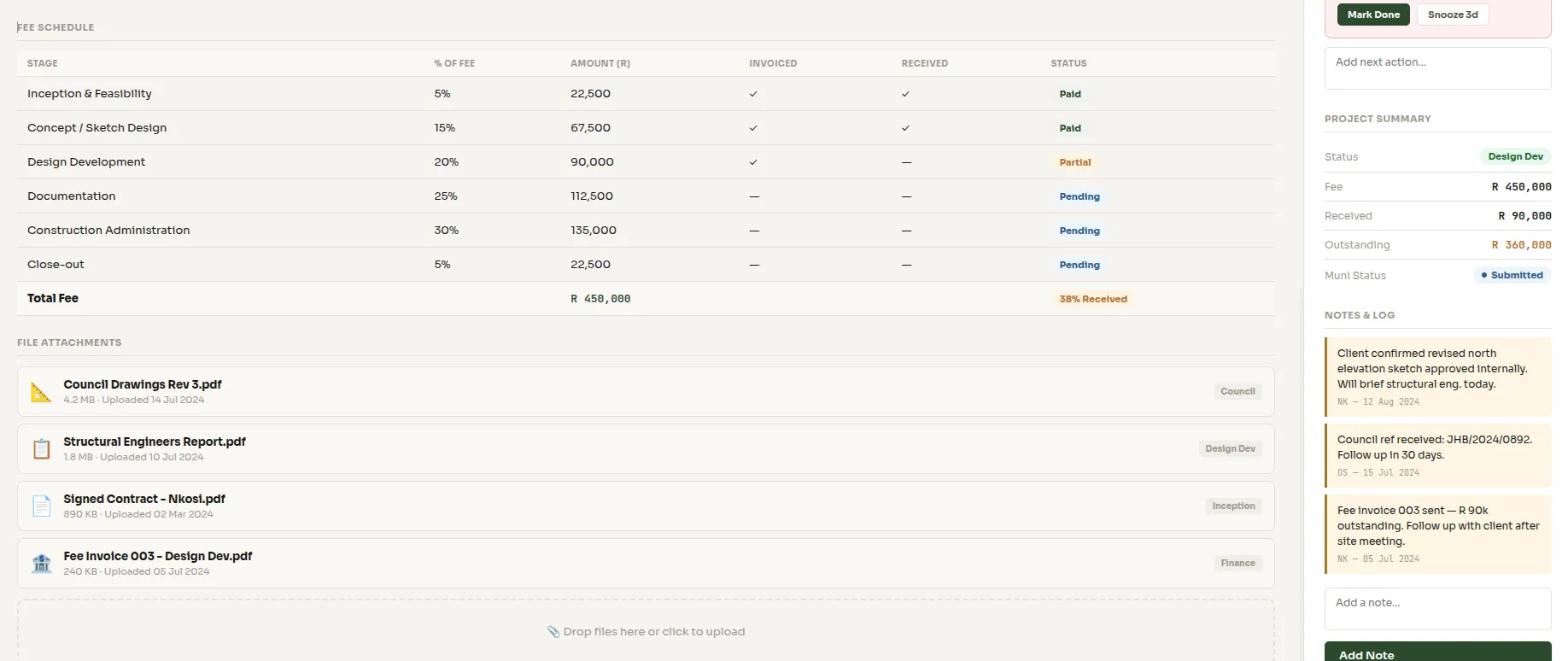
Project Detail View
Click into any project to see full details — timeline, attached documents, council correspondence, fee history and notes.
ClickUp for Architects
ClickUp for architects offers more flexibility than Trello and more views than Asana — but that flexibility comes with complexity. ClickUp has hundreds of features, most of which architects don't need. The setup time is significant, and the learning curve is steep for teams who just want to see their projects in a table.
A custom-built project architect manager gives you exactly what you need and nothing you don't. No feature bloat. No per-seat licensing that scales with your team. A one-time build that fits your firm like a glove.
How We Build It
We start with your spreadsheet. Literally. Send us the Excel or Google Sheet you use today, and we'll build a web application that mirrors its structure — same columns, same logic — but with the features a spreadsheet can't offer:
- We map your existing columns to a proper database
- We add automation — reminders, notifications, status triggers
- We attach documents and files to project rows
- We add compliance checks and council tracking
- We deploy it as a web app — accessible from any browser, any device
Your team logs in, sees a familiar table, and starts working. The difference: it's faster, shared, automated and reliable. No more emailing spreadsheets. No more version conflicts. One source of truth for your entire pipeline.
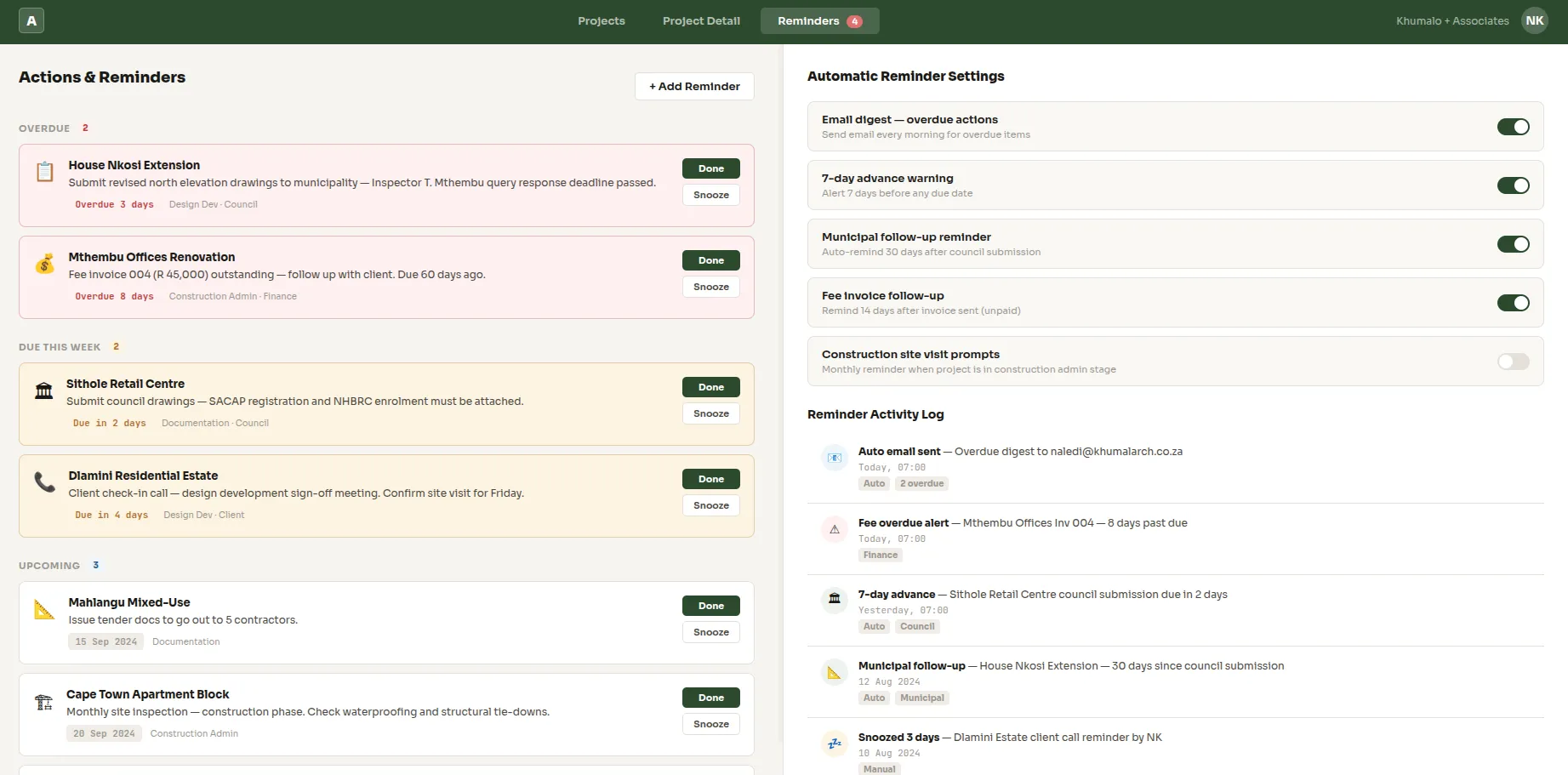
Notifications and Reminders
Automatic alerts for upcoming council deadlines, overdue fees, pending client approvals and next actions — delivered via email or in-app.
Who Is This For?
Small to mid-sized architecture firms that currently manage projects in Excel or Google Sheets. Solo architects who need more structure but don't want the overhead of Asana, Trello or ClickUp. Firms that have tried generic project management tools and found them too complex or too generic for architecture-specific workflows.
If your firm manages a pipeline of 10–100+ projects and you're tracking everything in a spreadsheet, this is for you. The project architect project manager we build will mirror your existing workflow, add automation and reminders, and give your team a system they'll actually use.
Ready to Upgrade from the Spreadsheet?
Send us your spreadsheet — we'll build a project manager for architecture firm that feels familiar but works like proper software. Pipeline, clients, council, invoices, design progress — all in one place with automation and reminders. See our AI development and automation services for more.
Book a Meeting